

Hey, everyone. My name is Shannon and I am a graphic designer and content creator from Chicago, IL. I started Design Dirt as a way to track my progress as a creator and designer. The world of design is vast and can be scary. My goal is that I can hopefully help other designers just starting out to not feel so alone in the creative shark tank we all want to thrive in. Design Dirt is where I will let other’s in on my secrets, tips, tricks, processes on graphic design, illustration, content creation, and whatever else the industry throws my way.


How to Create Artwork for T-Shirts: A Guide for Artists Designing for Screen Print
Are you an artist that needs to create artwork for screen printed t-shirts? Use this guide to help you set up your artwork files the right way. Explains screen-printing basics and how the method affects your artwork creation.
What’s the difference between creating artwork for paper and creating artwork for a shirt?
So, you’re an artist or graphic designer who’s used to creating art for paper or designs that stay on the screen such as social media ads or websites. But now, you’re curious for your own art adventures or a client has asked you to create artwork for shirts! Where do you begin?
You may be asking What’s the difference between creating artwork for paper and creating artwork for shirts? Great question. The main difference is the ink that is used to print with and the printing method.
There are many different methods of decorating garments. This includes screen printing, heat pressing, sublimation dyeing, DTG or direct-to-garment printing, embroidery, bedazzling, tie-dye, and more. Depending on the method used to print with will determine the thickness and finish of the ink, how fine the details of your art can be, and how your files should be set up. The most popular and most common way you will find, however, is screen printing. This is the method we will use to go over how to create artwork for t-shirts.
How does screen printing work?
The most common form of printing on shirts and garments is screen printing or silk screen printing. This process uses screens that are coated in emulsion. The screen with the emulsion is then placed by a light source, most often a light table, and a clear see-through plastic, or Mylar, with the image printed in black is placed between the screen and the light source. Wherever the light hits the emulsion is where the emulsion hardens. The image, printed in black, blocks out the light from hitting the emulsion, so wherever the image is, does not harden or cure.
The emulsion will not harden where the black ink on the clear plastic sheet is. This uncured/unhardened emulsion then washes out with water. This allows you to then push ink through the screen onto a garment and the ink will only go through the screen where there is no emulsion.
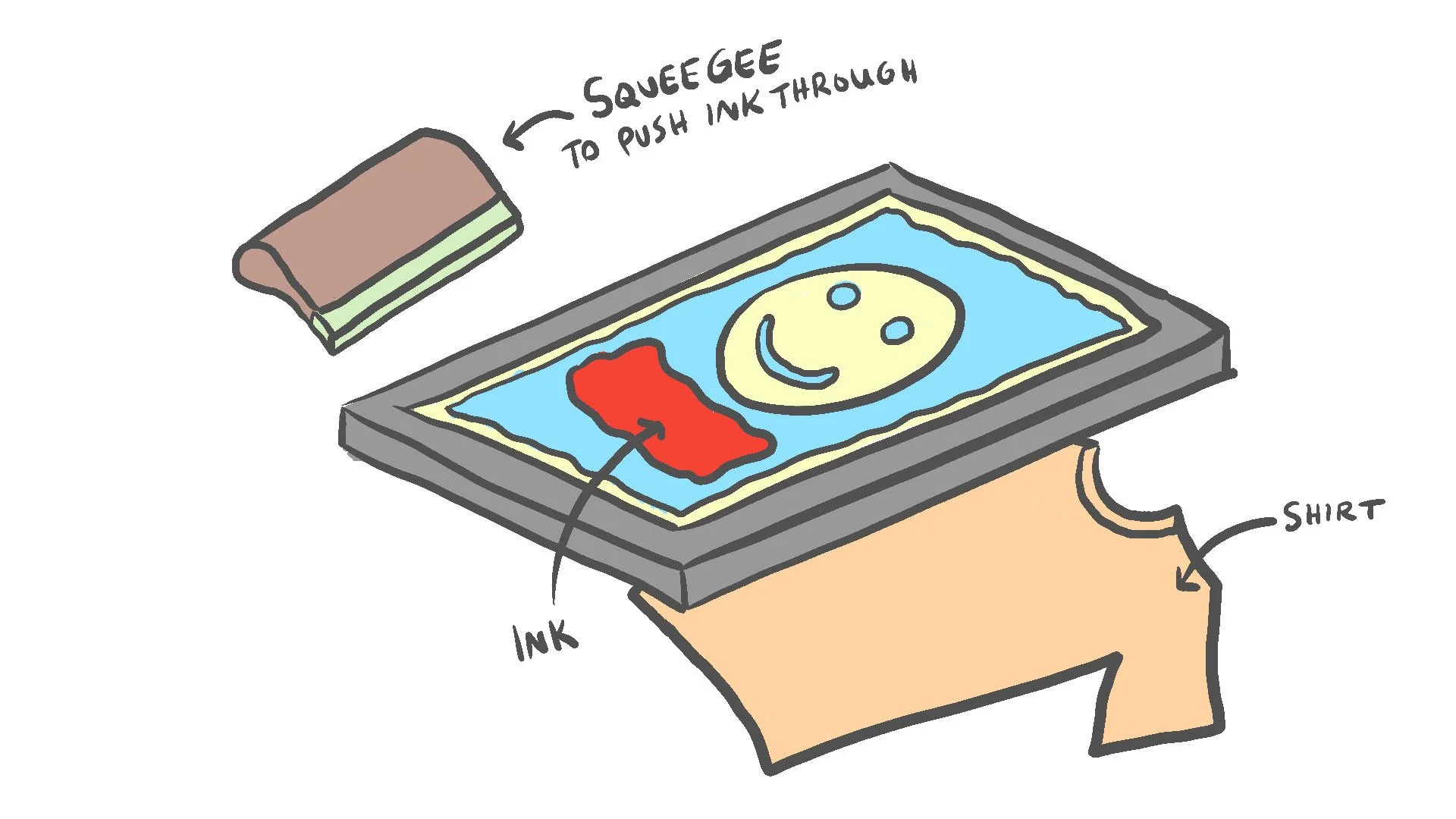
Screen printing may seem like a complicated process but the concept is pretty simple. There is a screen with holes. The emulsion closes some of the holes. The ink will only go through where there are still open holes.
This method is pretty cool because it allows you to “layer” or “stack” colors on top of one another by printing different screens in the same spot. The process of lining up all of the different screens to create one image is called registration. Registration is important because it plays a role in how your artwork should be set up.
Adding Bleed to your Screen Printing Artwork
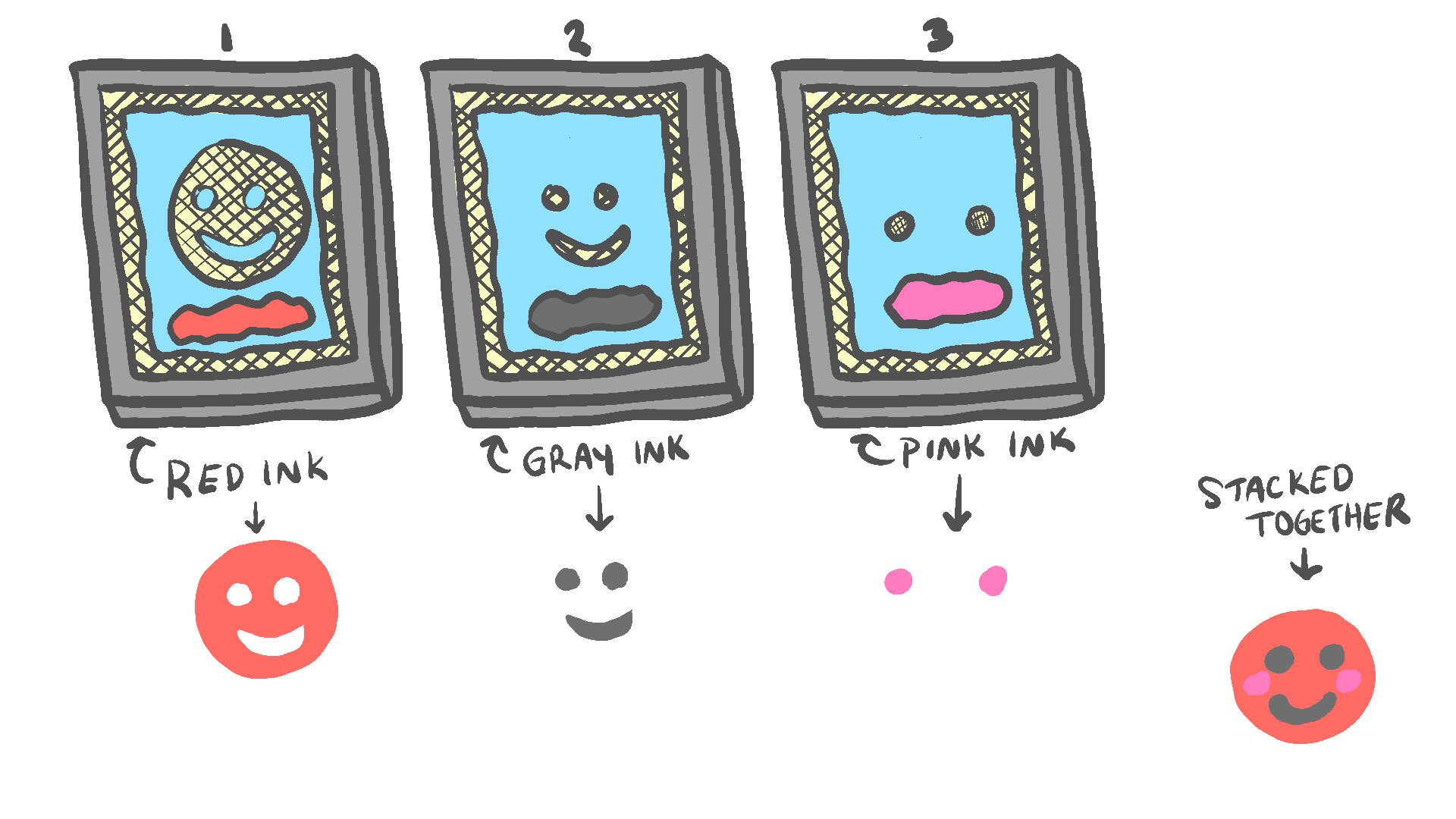
Here, you have three screens.
The first one puts down the red, which is the circle and main color for the smiley face.
The second one puts down the gray for the eyes and mouth.
The third one puts down the pink circles for the blushing cheeks.
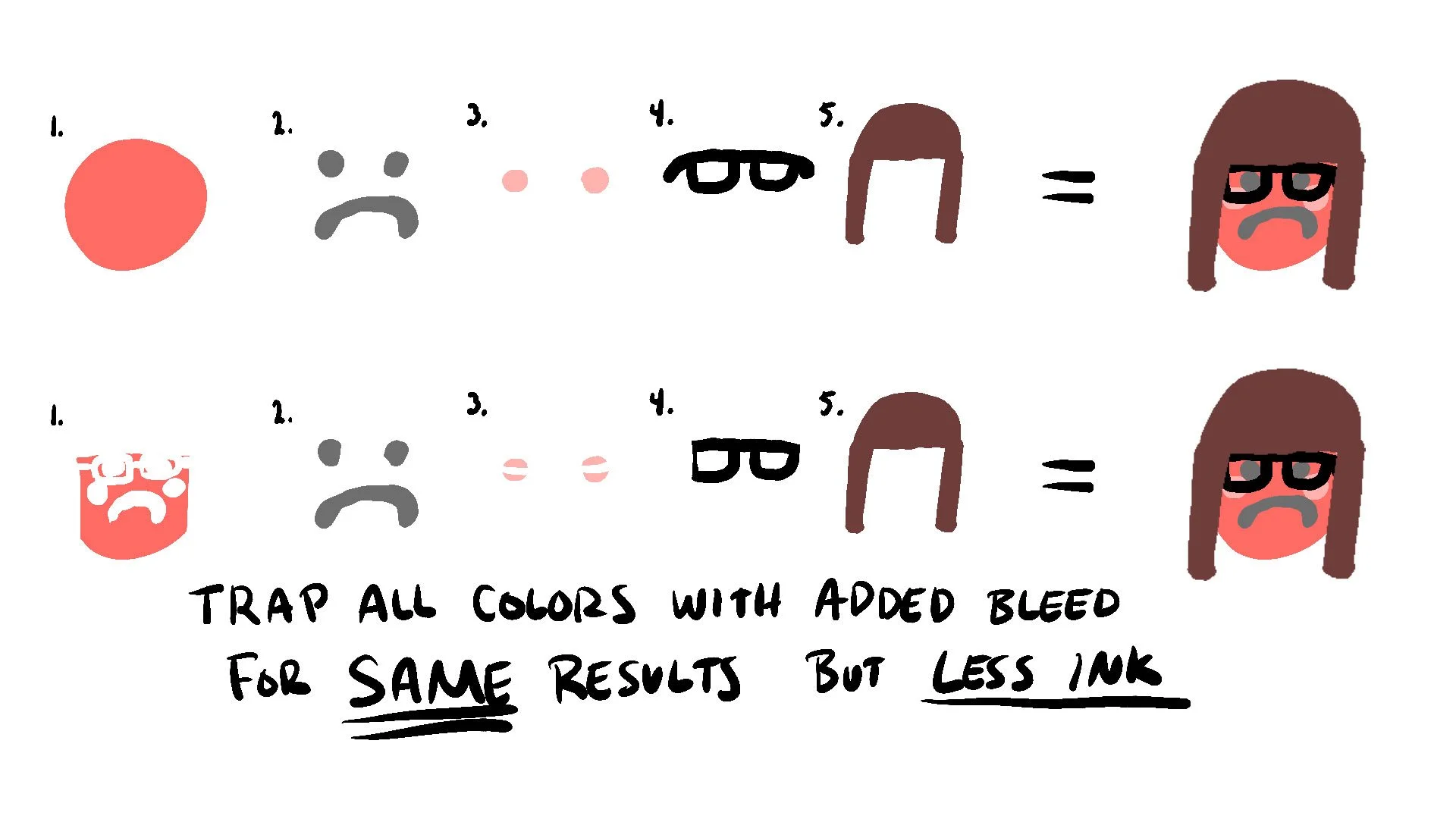
You may notice the eyes and mouth of screen two is missing from screen one. This is a registration technique called “trapping.” This means the gray ink is meant to be trapped inside of the red ink once printed. But what happens if the screen moves slightly? This is why we add bleed, or “extra” artwork on a screen that will be underneath another screen.
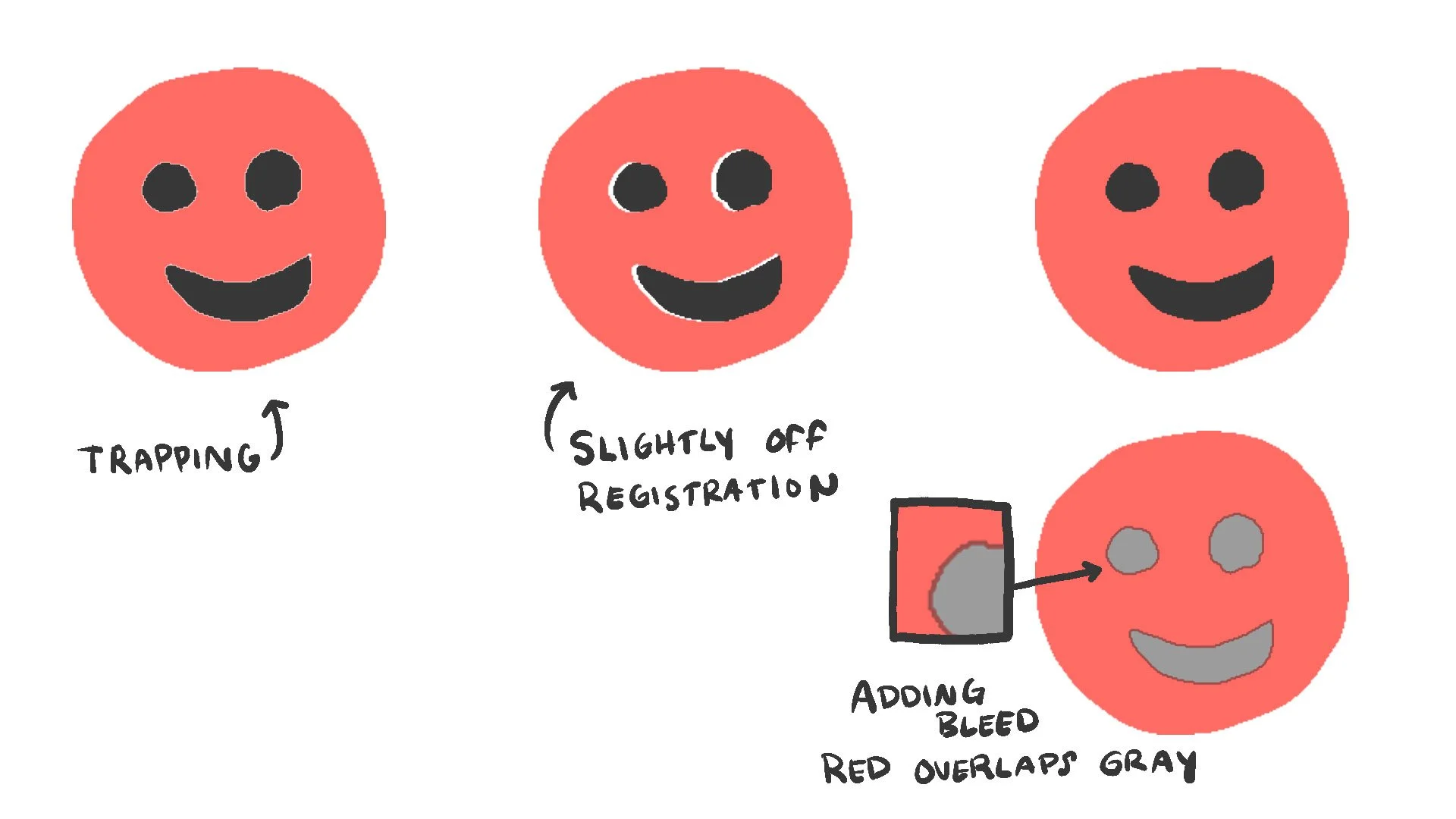
The first smiley shows what happens when the gray ink is trapped inside of the red ink. You may see the slight white line between the two. Since the gray is exactly the same size as the red, there may be a sliver of space when printing.
Often times, the press that holds the screens can shift slightly during printing. This is normal and is a result of the pressure of squeezing the ink through with the squeegee. Depending on the quality of the press, the press being used may also have slight variances in registration.
The second smiley shows what can happen if the registration is slightly off or shifts lightly during printing. There is now a larger sliver of white on one side. To prevent this from happening, we add “bleed” to the artwork. The red is now slightly larger only where the gray will go so it can overlap when printing and prevent any white space from showing through.
A really good printer knows how to hold tight registration, but it’s always good to err on the side of caution when setting up artwork. Some printers who are newer to the industry may not have the experience to trap artwork without bleed and may not have a graphic artist to make bleeds properly. If you make sure your artwork file has bleeds, you’ll be good to go.
So you might ask…
Why trap the screen printing ink in the first place if it could print off registration?
Excellent question. The trapping of ink layers has a few purposes.
1. Heaviness
One of the main reasons is that the layers of ink can get pretty heavy. If you look at the image, you can see the first smiley has only two layers of ink. It might be okay for two layered designs, but when you have five layers of ink layered on top it will begin to get very thick and heavy.
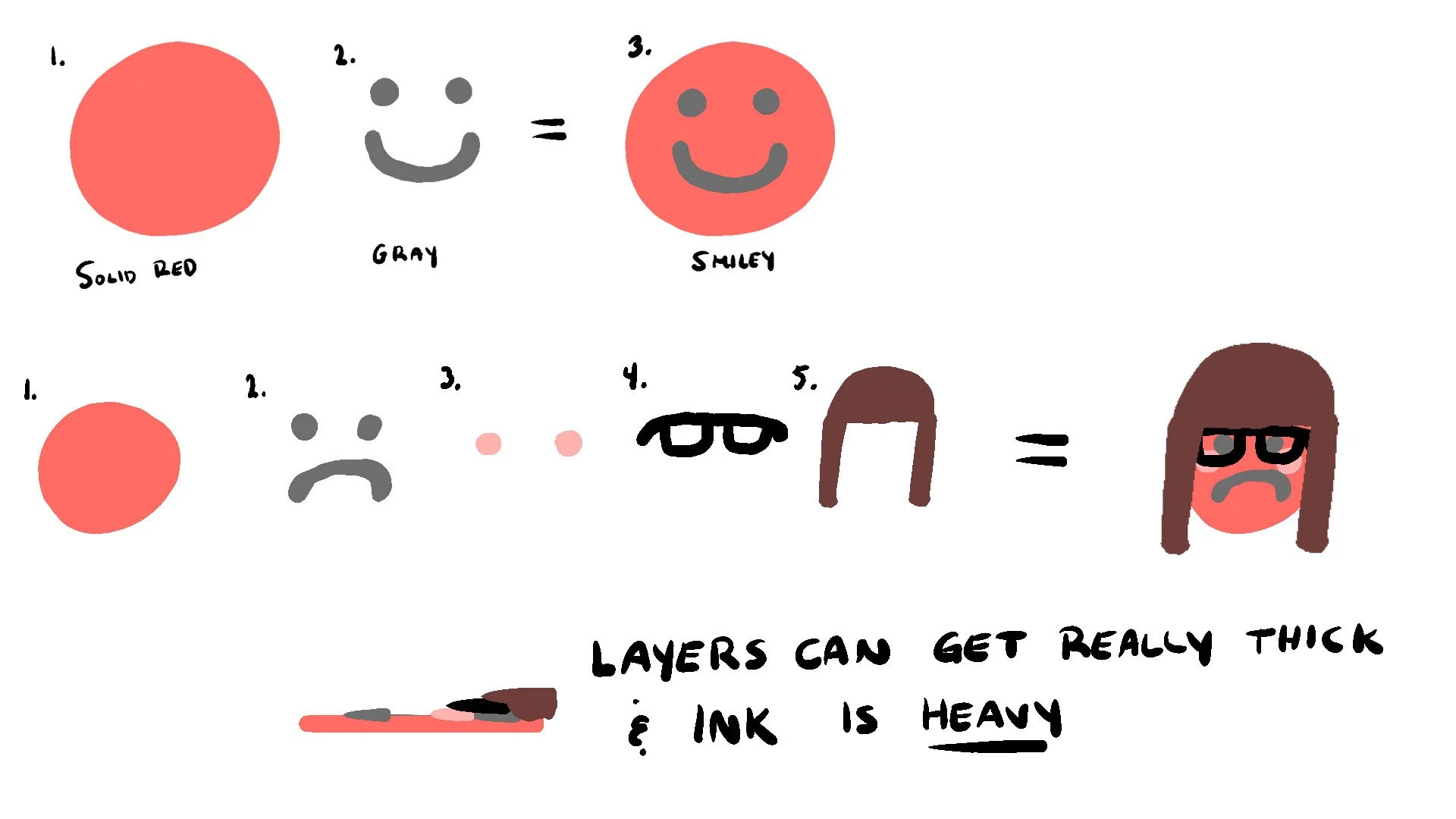
This can result in a very uncomfortable t-shirt. Do you remember those hot summer days being outside in the blazing sun and your t-shirt starts to stick to your chest? Fabric is likely to do this in high temperature anyway…but how much worse will it be if there is a very thick and heavy layer of ink on top of it?
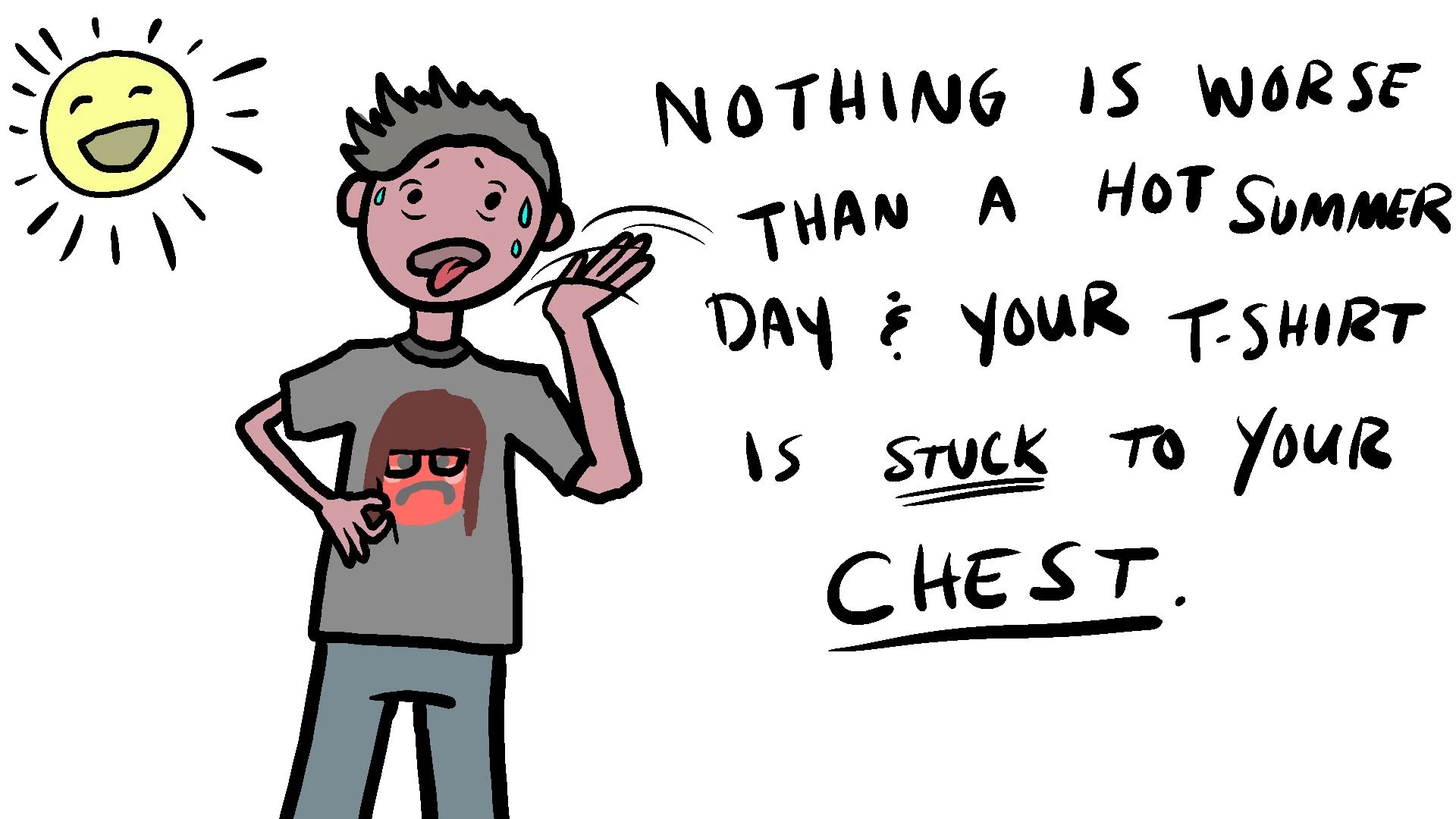
This is why it’s better to trap the ink layers inside of each other so they lay flat and smooth on the shirt surface, rather than building up to a thick heavy layer.
2. Color Changes
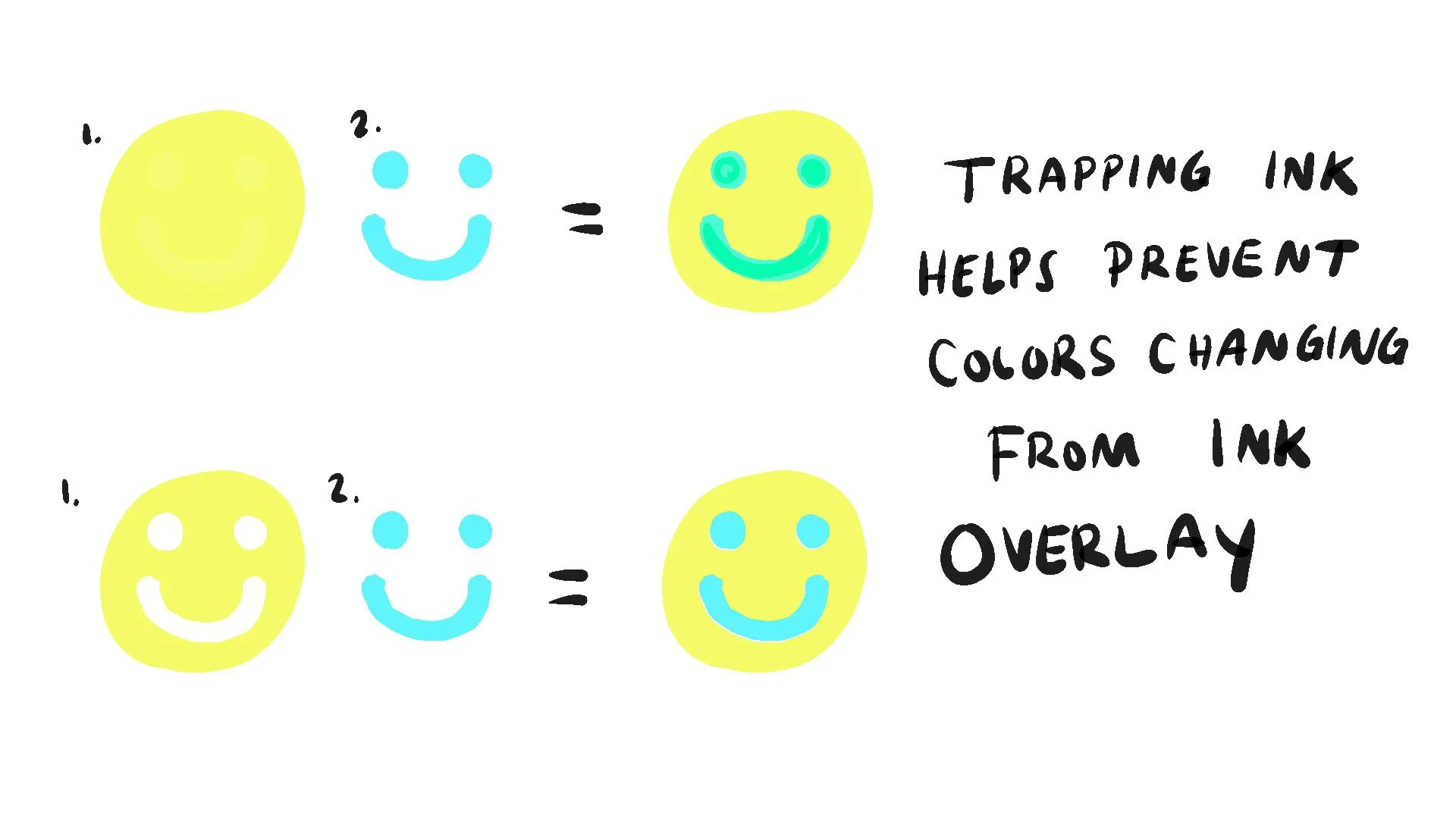
Another reason for wanting to trap your ink is because the inks used for screen printing are not always opaque. This means some inks may have more “see through” qualities than others.
It is common practice in the screen printing industry to print colors lightest to darkest. However, the dark colors don’t always cover the lighter ones as perfectly as we’d like. This means if you layer say, a pastel blue over a yellow, the result may look slightly greener than you would like.
By trapping the colors, you minimize the possibility of ink changing.
3. Cost
This one may be a bit of a no-brainer but less ink = less cost. The less ink used will result in less material being used which can lower the costs of printing. This may be more on the printer’s side of things rather than the artist but it’s something to keep in mind if you are looking to be more efficient.
Half Tones and Gradients
We’ve gone over how screens are made as well as how colors may be layered on top of one another to create a multi-color image for print. The examples drawn above are what we would refer to as “spot colors” or blocks of specific color in a print. The smiley face is one color and the eyes and mouth another.
But what if you wanted to see a gradient of colors or maybe even a photograph?!
This is where the concept of half tones comes in.
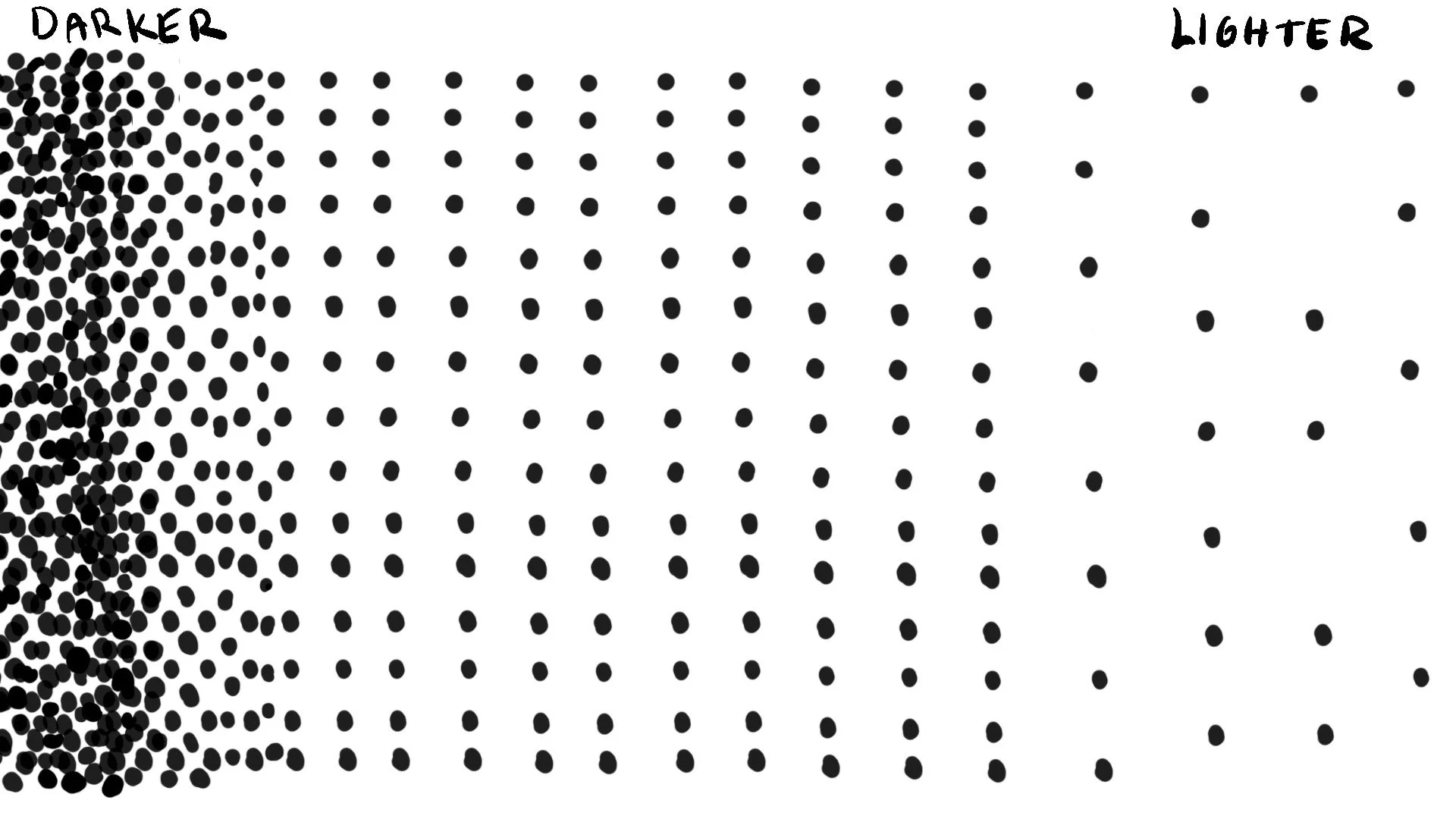
Half tones are essentially playing a trick on human eyes. Our eyes see the dots and the space between the dots. This means when our brains see lots of dots together with not much space between them, it perceives it as darker. When our brains see very little dots with lots of space between them, it perceives it as lighter. We can play with this concept to create full images that are just dots.
Screen Printing Mesh Screens
The material that screens are made from is called a mesh…and meshes come in many different counts. The mesh count refers to the amount of threads that cross each other in every square inch of the screen. The mesh is woven, just like any other fabric. (Silk used to be used, which is how silk screening came to be.)
You may be familiar with the concept of “thread counts” from buying clothing or your bedroom sheets. The higher the thread count, the finer the fabric is. Same concept here: the higher the mesh count, the finer the screen.
The mesh on the screen is very important because the finer the screen, the finer the details can be when washing the screen out. But you also have to keep the emulsion in mind. Some emulsions are able to “stick” to finer mesh a lot better than others. So it’s important to find a printer who understands emulsions or has the ability to use an emulsion that can hold fine detail. The hardened emulsion needs something to “hang” onto and so can only hang on where the threads are.
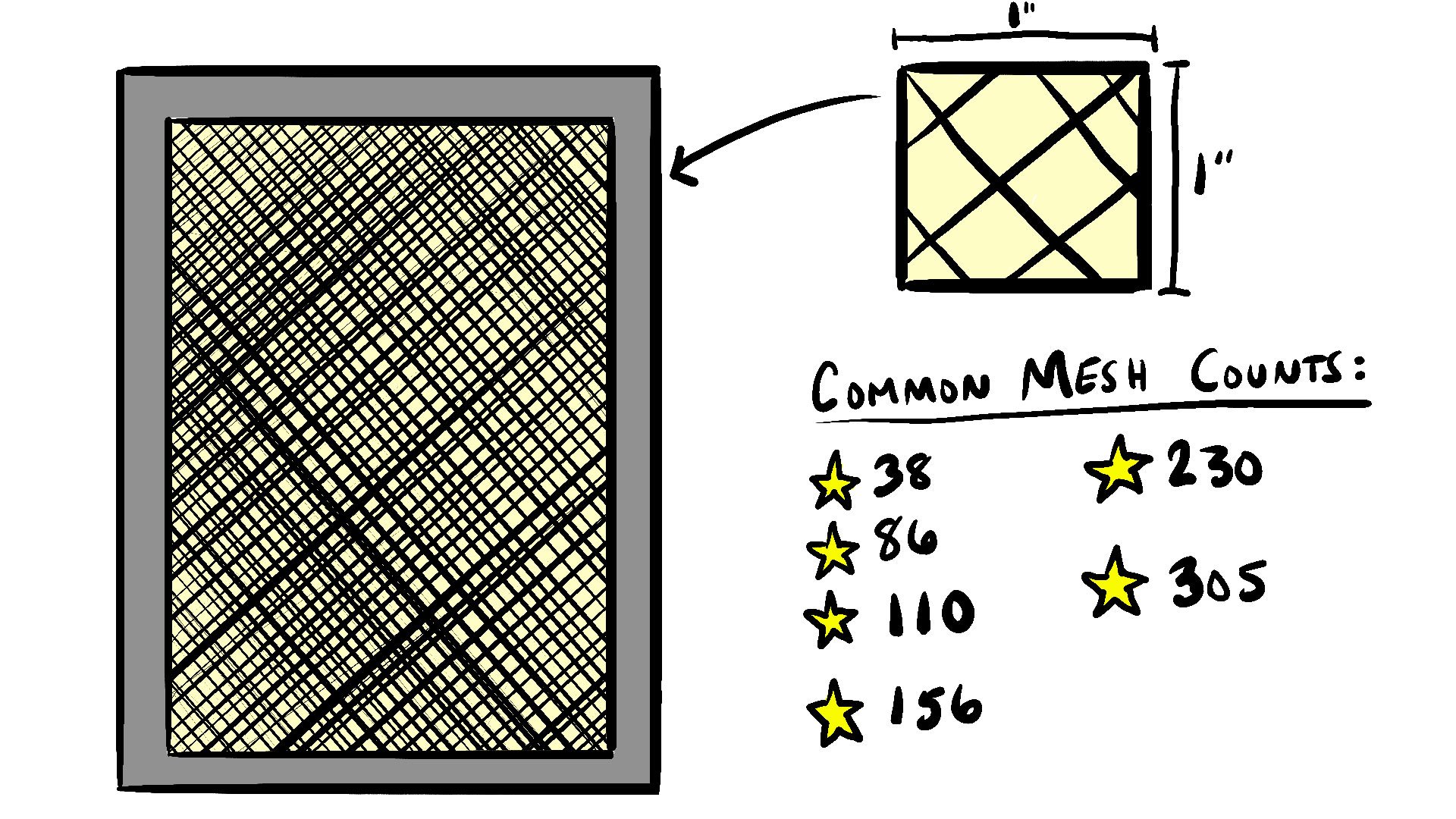
Some of the most common mesh counts are 38, 86, 110, 156, 230, and 305. These are important because they all have different uses.
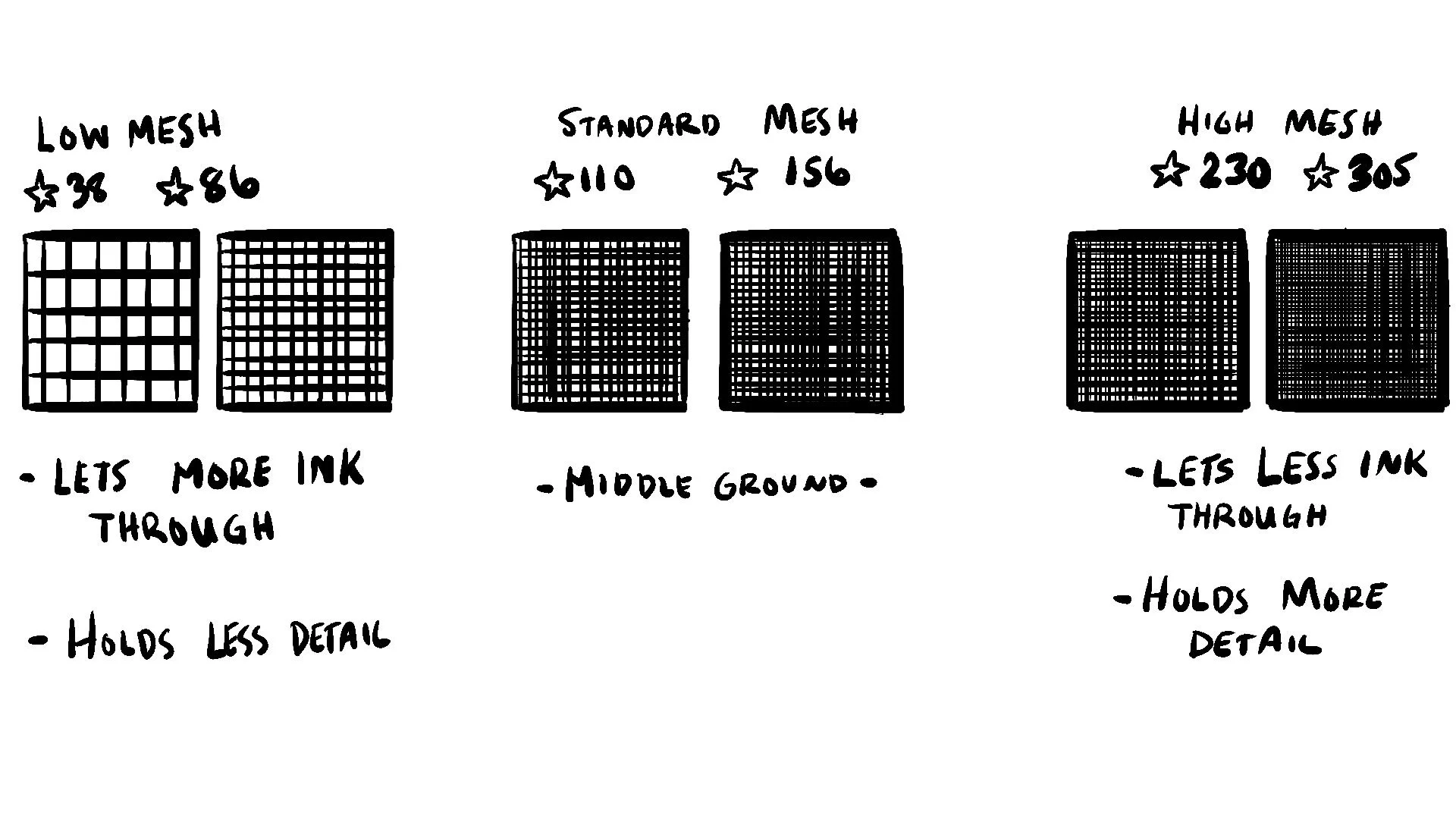
Low meshes are great for thicker specialty inks such as metallic or ‘puff’. The larger the “holes” between the threads, the more ink will get let through the screen. This will result in a heavier feel since more ink is let through.
Standard meshes are typically used for underbases (we’ll get to underbases in a second…) and large blocks of color like block letters or the smiley face shown above. They are the best of both worlds allowing for medium ink coverage and medium amounts of detail.
High mesh is best for photographs and artwork with lots of detail. The higher the mesh count, the smaller the holes between the threads, so the less ink gets through the screen. This also results in a softer feel since less ink is on the shirt.
So, what does mesh count have to do with artwork?
The mesh count is important because it directly relates to the resolution of the artwork. The resolution is the dots per inch of the artwork itself. The more dots, the finer the detail.
We’ve already discussed how emulsion needs threads to hang on to when curing on the screen. The uncured emulsion gets washed away and if hardened emulsion is weakened by having no threads to grab onto, it will also fall off or wash away.
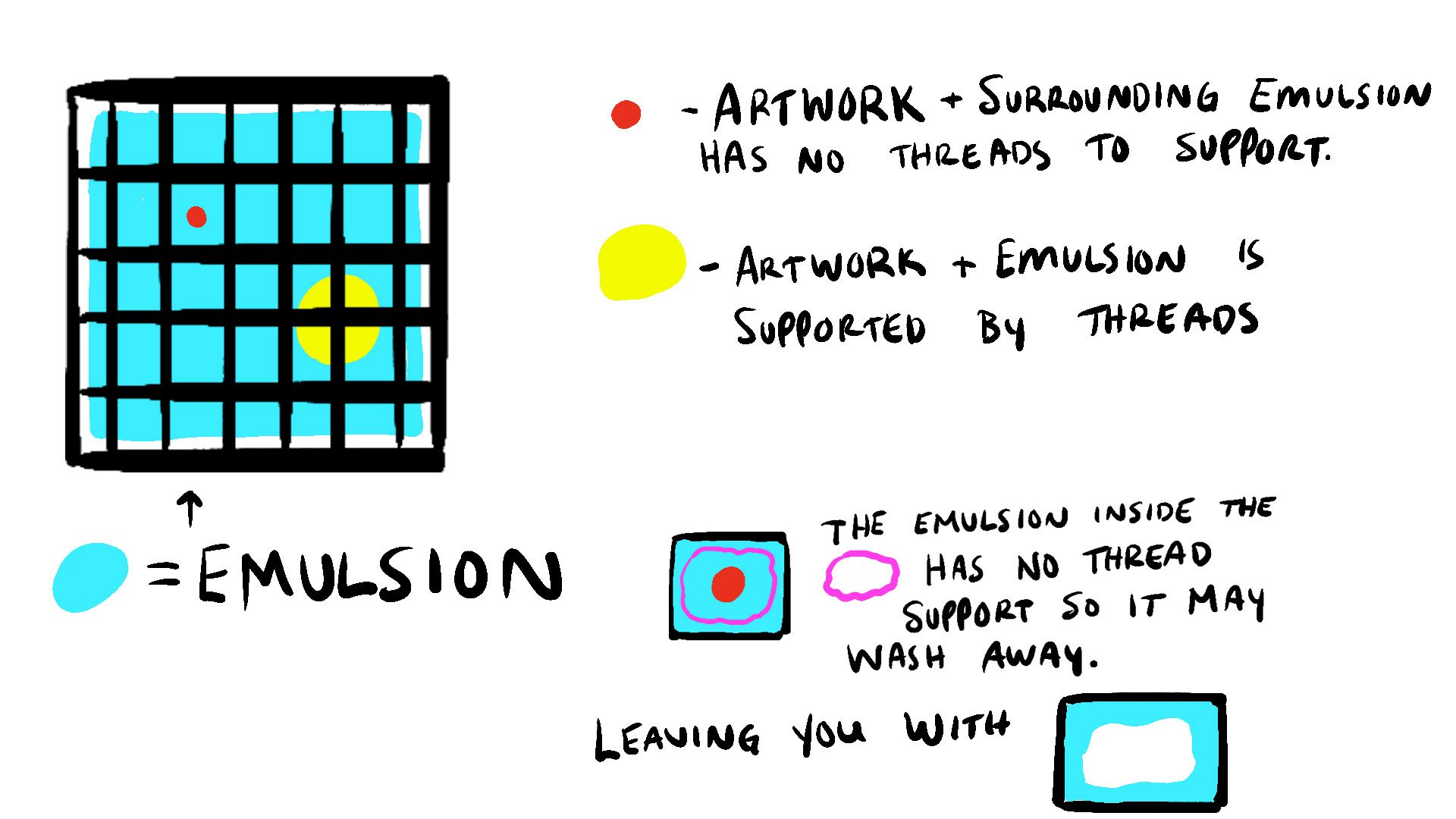
It’s important to make sure details of the artwork are not so small that they get lost in the screen such as the red dot in the image above. Even while using the highest mesh count, some very fine details can get washed away because they are too small for the area between threads.
Alternatively, you want to make sure you don’t make your artwork too low resolution either. The edges of artwork can become pixelated if you make artwork too small and then try to make it larger later on. It’s always better to start large and compress a copy if you have to later on because it is very difficult to make a low resolution look good at larger sizes.
CMYK Process Printing
What in the heck did she just say? Now that we’ve gone over some basics of how the screens actually work, it’s important to go over something a tiny smidgen more complicated…CMYK printing also known as process printing. You may have heard the term CMYK before, especially if you’ve been designing for printing on paper. CMYK stands for the four colors most commonly used in process printing which are cyan, magenta, yellow, and black.
There are two standard color profiles that dominate in the world of art.
RGB and CMYK.
RGB stands for Red, Green, and Blue and is used for digital images that don’t leave a screen. This includes your computer monitor, your phone, and your television. This color profile is based off of light. It uses additive properties to add color to the light to create the different hues and the absence of the light creates black.
CMYK is used for ink mixing and is subtractive. It uses the presence or absence of black to determine the tint of the color and subtracts white from the paper. This mode is used for off screen artwork and printing, meaning there is no light behind it. Standard home printers, large scale industrial printers, and screen printers alike all use CMYK when printing.
It is very important to design your artwork that is going to be printed on t-shirts in CMYK mode. A lot of times artwork is designed in RGB and the light behind the screen makes the color look vibrant and really “pop.” But when the artwork gets converted to CMYK to be printed, the customer is disappointed because the color can then look washed out without the light of the screen behind it. By designing in CMYK, you are creating a realistic version of what the artwork will look like once printed.
Combining the Concept of Halftones with CMYK to create Full Color Dot Screens
By combining what we’ve learned so far about halftone dots with the CMYK color profiles, we can create four screens for silk screening that layer on top of one another to create a full color image. Like the halftones from above, the dots of the screens create an illusion to the human eye. Each color will consist of only dots, but when combined will create different colors to our minds.
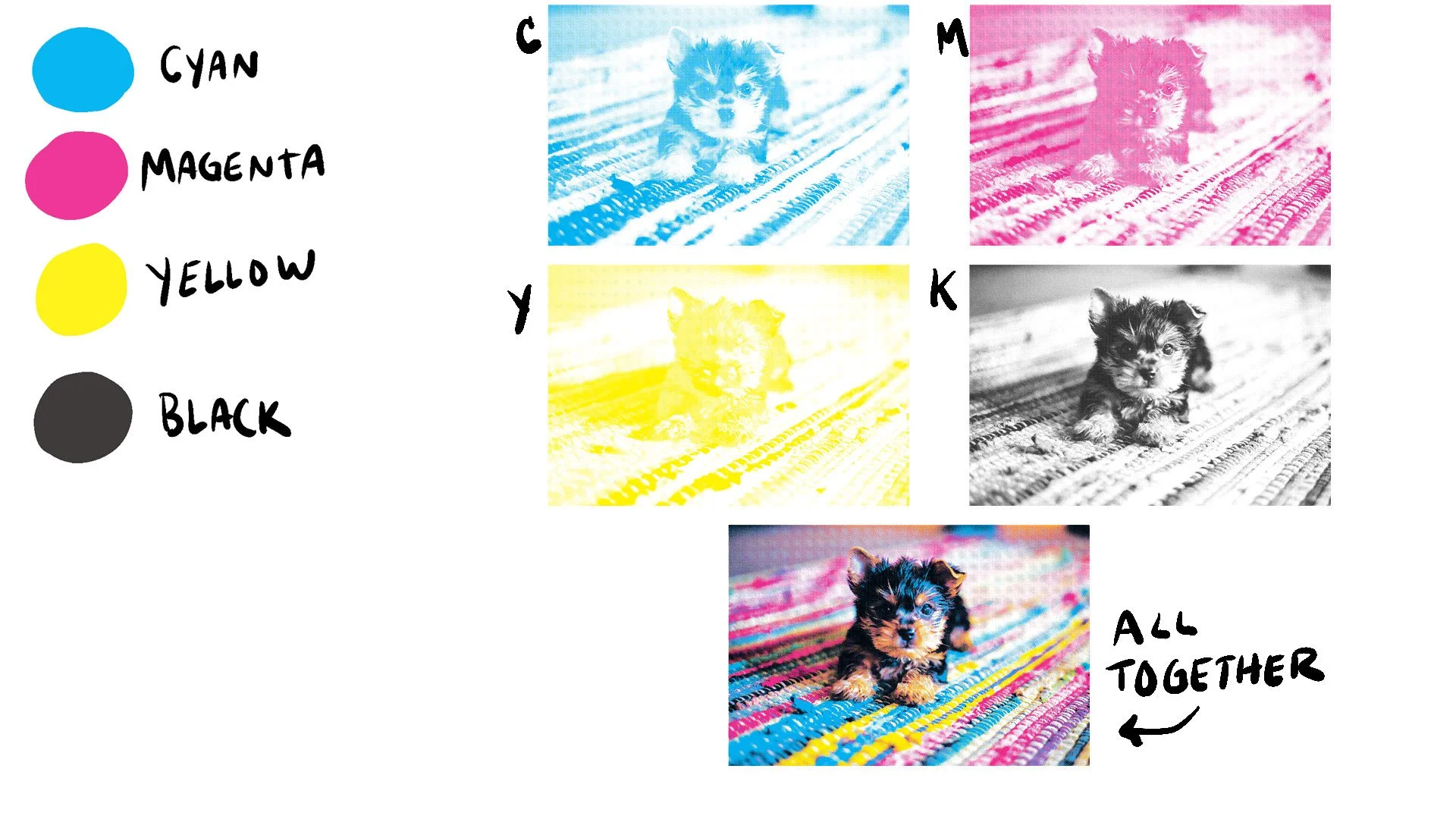
You’re telling me I can create full color photographs with screenprinting with just four screens?!
Yes.
HOWEVER.
Like everything else, there are some good uses for it and some not so good uses for it. Similar to the smiley face from the screen making process above, large blocks of single color are not so great for process printing. A photograph looks awesome because the smaller dots can mush together to create the illusion of a full color photograph. But what if you wanted, say, a full block of orange? The CMYK process would use only the Magenta and Yellow to try to make orange. The dots however would need to be larger in order to make this illusion work, so it wouldn’t look too great and would be grainy. It would be better to use a spot color for the orange.
It is also relevant here to note that the finer details of the photogaph may get washed away in the screen. You would want to choose a photograph that did not have very fine details to ensure it could be held in the screen mesh. It is also important to note that with CMYK process printing, there is no room for a “bleed” like there is with spot colors. If even ONE of the four screens slightly shifts, it could result in a blurry image. It’s important to find a printer that has the press and capabilities to hold very tight registration when printing with CMYK process printing.

The Use of Underbases
dun DUN DUN! It is time for underbases. If you recall from learning about screen mesh count, the standard screen meshes were good for underbases. What is an underbase?
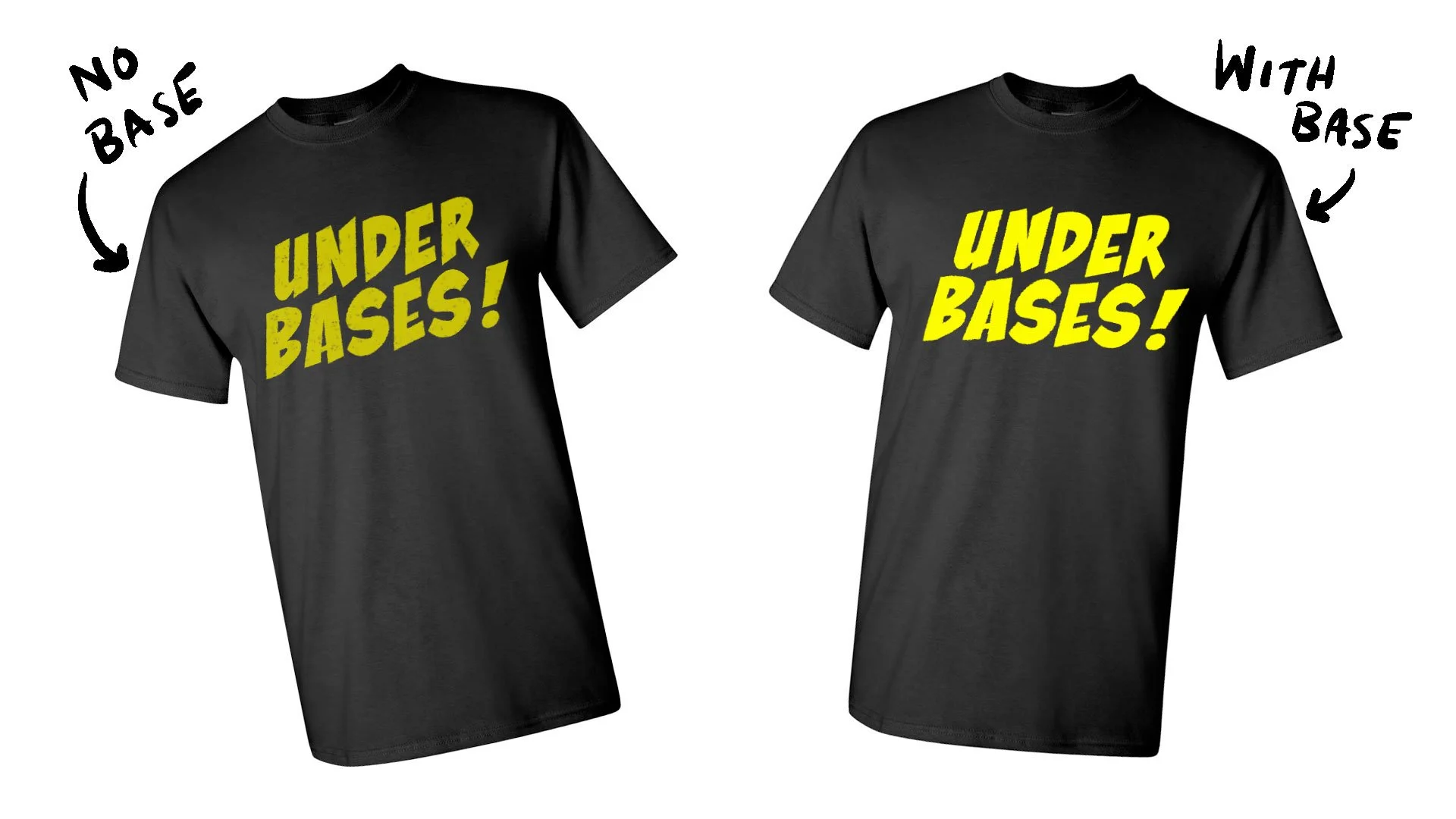
An underbase is used when printing on dark garments to make sure the other colors have a nice white base to sit on top of. I’ve mentioned that some screen printing inks aren’t fully opaque which means there’s some transparity to them. If you were to print a pale yellow on top of a black t-shirt, the black of the fabric would still be able to peak through the yellow ink, resulting in not-so-great speckled black yellow.
It is the same concept as repainting a room in your home. It’s always better to give it a nice, fresh coat of white before you put down your new color.
If you are going to be printing on a darker garment that would require an underbase it’s important to note that this will add another layer of ink therefore making it heavier. The base will also need to follow the bleed rules and be slightly smaller than the other print elements so white doesn’t end up peaking through if the registration shifts.
Phew! So, with all this new information…how should you set up your artwork?
The Artwork Check List for Designing for Screen Printing:
Make sure you start your file size at a high resolution AT the size it is going to be printed.
Double check with your printer what their exact specs are for resolution and print size. In the case that you are working with a client and not the printer, it is industry standard to have your artwork be at least 300dpi and the artboard or canvas the exact size it is going to be printed.
For my own use, I make my file size 14” x 16” at 600dpi.
Is your file in CMYK color mode and not RGB?
Make sure you are working in CMYK color mode and not RGB. RGB is for digital, on screen artwork only. CMYK is for printing.
Make sure your artwork is not too detailed
Make sure your artwork is not overly detailed or the details are too small! The smaller the details, the less chance of it holding up in a screen will be.
Think about the layers of color. Will the ink coverage be too heavy and cause the shirt to be uncomfortable?
You don’t want your shirt to be too heavy once all that ink is on there. Think about using outlines of color rather than large blocks of color.
Where will this be printed? Check with your printer to see up to how many colors you can include in your design.
Nothing is worse than spending hours creating a 10 color design only to find out the printer who will be printing the design can only go up to 8 colors! Make sure you check with your printer or client on how many colors the design can be. If the client is not sure where they will be printing yet, it’s a safe bet to stick with 5 or less. Most professional printers have at least a five color press in their arsenal.
Make a Digital Mock Up
Make sure to mock up your shirt on the garment you want it to be printed on. This is to ensure it looks how you intend it to look before having to go through the costs of printing just to find out you don’t like the fabric color with your design. It will save you and your client a headache and lots of money in the long run.
..and remember to have fun with it!
T-shirts and garments are one of the funnest things to design because people wear them around. It’s always cool to see your hard work around in the world so make sure to have fun and create something you want to see people wearing out and about.
Go! Get creating!
Search Posts
-
Apparel and Printing
- Apr 20, 2022 How to Create Artwork for T-Shirts: A Guide for Artists Designing for Screen Print Apr 20, 2022
- Nov 2, 2020 From iPad to Shirt: Halloween Edition Ft. Goof Nov 2, 2020
-
Art Processes
- Apr 20, 2022 How to Create Artwork for T-Shirts: A Guide for Artists Designing for Screen Print Apr 20, 2022
- Nov 2, 2020 From iPad to Shirt: Halloween Edition Ft. Goof Nov 2, 2020
- Sep 2, 2020 Tech Talk: My Tools for Digital Artwork Sep 2, 2020
- Jun 29, 2020 The Process Behind the Label: Designing My First Beer Can Jun 29, 2020
- May 20, 2018 The Process of Designing Posters May 20, 2018
-
Product Reviews
- Sep 2, 2020 Tech Talk: My Tools for Digital Artwork Sep 2, 2020
-
Technology
- Apr 20, 2022 How to Create Artwork for T-Shirts: A Guide for Artists Designing for Screen Print Apr 20, 2022
- Sep 2, 2020 Tech Talk: My Tools for Digital Artwork Sep 2, 2020
Are you an artist that needs to create artwork for screen printed t-shirts? Use this guide to help you set up your artwork files the right way. Explains screen-printing basics and how the method affects your artwork creation.